Never Miss Another Deal!

No Fuss Deal Surprise Me
Editor's Choice

Amazon Kindle Paperwhite 16GB Review: The Distraction-Free Reader That Is Worth the Upgrade

The Amazon Kindle Paperwhite 16GB is a distraction-free reader worth the upgrade. Rated 4.6 out of 5 across 22,860 user ratings. We scored it 4.6 out of 5.

By ZappyZep, Tech Editor Published April 11, 2026 Updated September 26, 2026
4.6Our score
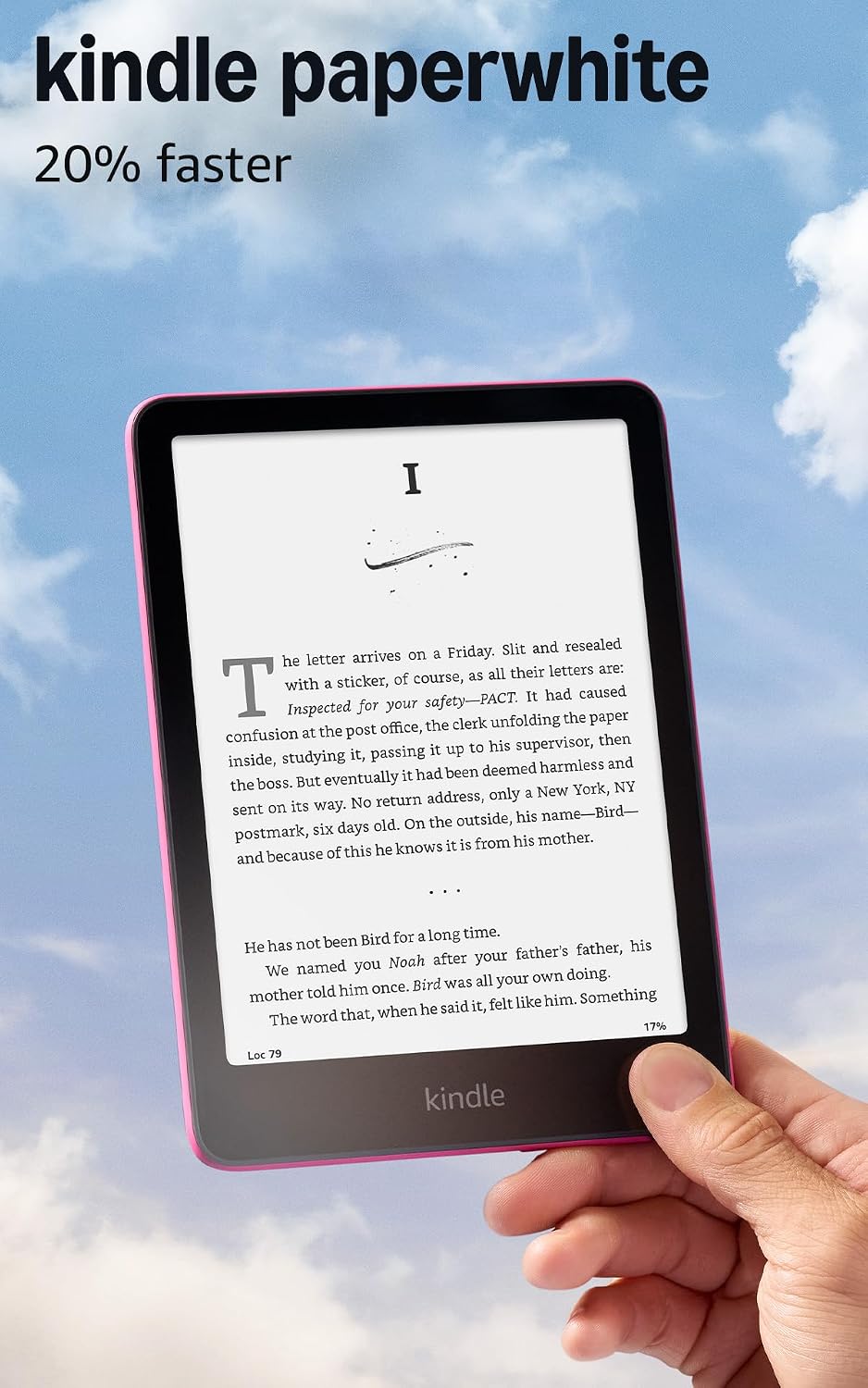
Amazon Kindle Paperwhite 16GB (newest model) – 20% faster, with new 7" glare-free display and weeks of battery life – Black Amazon Kindle Paperwhite 16GB (newest model) – 20% faster, with new 7" glare-free display and weeks of battery life – Black, view 2 Amazon Kindle Paperwhite 16GB (newest model) – 20% faster, with new 7" glare-free display and weeks of battery life – Black, view 3 Amazon Kindle Paperwhite 16GB (newest model) – 20% faster, with new 7" glare-free display and weeks of battery life – Black, view 4 Amazon Kindle Paperwhite 16GB (newest model) – 20% faster, with new 7" glare-free display and weeks of battery life – Black, view 5 Amazon Kindle Paperwhite 16GB (newest model) – 20% faster, with new 7" glare-free display and weeks of battery life – Black, view 6 Amazon Kindle Paperwhite 16GB (newest model) – 20% faster, with new 7" glare-free display and weeks of battery life – Black, view 7 Amazon Kindle Paperwhite 16GB (newest model) – 20% faster, with new 7" glare-free display and weeks of battery life – Black, view 8 Amazon Kindle Paperwhite 16GB (newest model) – 20% faster, with new 7" glare-free display and weeks of battery life – Black, view 9 Amazon Kindle Paperwhite 16GB (newest model) – 20% faster, with new 7" glare-free display and weeks of battery life – Black, view 10 Amazon Kindle Paperwhite 16GB (newest model) – 20% faster, with new 7" glare-free display and weeks of battery life – Black, view 11 Amazon Kindle Paperwhite 16GB (newest model) – 20% faster, with new 7" glare-free display and weeks of battery life – Black, view 12
Product gallery, 12 images

Prices shown were correct on September 26, 2026 and change frequently.

TL;DRThe Short Answer: Is the Amazon Kindle Paperwhite 16GB Worth It?

Reading on a phone means reading next to every notification you own, under a screen that shines straight into your eyes. The Kindle Paperwhite 16GB removes both problems, and if you are upgrading from an older Kindle, this generation's speed is the change you notice most. It suits anyone who wants to read more and scroll less. The one thing to know first: it runs no apps, so borrowing from a library app happens on your phone.

NoFussDeal rates the Amazon Kindle Paperwhite 16GB 4.6 out of 5 at $199.99. Last updated September 26, 2026.

What Stands Out

  1. Amazon's fastest Paperwhite yet: a 7-inch glare-free display with a higher contrast ratio and 25 per cent faster page turns
  2. A single USB-C charge lasts up to 12 weeks, according to Amazon, and in everyday reading it needs charging only every few weeks
  3. Light adjusts from white to amber, for bright sunlight or reading in bed without keeping yourself awake
  4. Waterproof, so Amazon pitches it for the pool and the bath, with 16GB of storage and no social media, notifications or distracting apps

Strengths and Drawbacks

What works

  • Battery life measured in weeks, with Amazon quoting up to 12 weeks from one USB-C charge
  • Waterproof, so it can come to the pool or into the bath
  • No social media, notifications or distracting apps, so reading gets your full attention
  • Warm light and adjustable text make it easy on the eyes, including at night
  • No lag when turning pages, searching or entering a PIN, a clear step up from older Kindles
  • Light and compact enough to hold in one hand and carry everywhere

What does not

  • Runs no apps, so library borrowing through apps such as Libby happens on your phone
  • Audiobooks play only through Bluetooth headphones or earbuds
  • Depending on your grip, a finger may brush the power button and put it to sleep
  • Larger than earlier Paperwhites, which takes a little getting used to if you are coming from a smaller model

Features in Depth

01

E Ink Is Not a Screen With the Brightness Turned Down

Display 7 inch glare-free Front light Adjustable white to amber Storage 16GB

The reason to own a dedicated reader rather than read on a tablet or a phone comes down to a difference in how the screens work, and it is worth understanding because it is the whole product. A conventional display emits light: a backlight shines outward through the panel into your eyes, which is why a phone is uncomfortable in a dark room and washes out in sunlight. An E Ink display emits nothing. Pigment particles are moved by an electric field to form the page, and you read it by reflected light, just as you read paper, so bright sunlight makes it better rather than worse. The Paperwhite's front light works the other way to a backlight, lighting the surface of the page rather than shining through it, and it adjusts from white to amber. That matters for evening reading: the warm setting makes it easier to fall asleep after reading in bed, and the light can be gentle enough not to disturb a sleeping partner.

$199.99 4.6/5 Check price
02

Twelve Weeks of Battery, and What Decides It

Battery Up to 12 weeks per charge Charging USB-C Wireless Wi-Fi and Bluetooth

Battery life is the headline strength, and Amazon's figure is up to 12 weeks from a single USB-C charge. That kind of endurance comes from the display technology described above: an E Ink page, once formed, needs no power to stay on screen, so power is used only when the page changes, when the front light is on and when the wireless is active. Treat the 12 weeks as a best case. With casual reading the real interval between charges is shorter but still measured in weeks, and turning on airplane mode between downloads stretches it further. The levers that change it most are covered in the questions below. USB-C is the connector, so it shares a cable with most modern phones and laptops.

$199.99 4.6/5 Check price
03

No Apps, No Notifications: the Feature That Is an Absence

Distractions No apps, no notifications Waterproof Yes Kindle Store Over 15 million titles

Amazon makes one of its main claims by listing what the Paperwhite does not have: no social media, no notifications, no distracting apps. For many buyers that is the real reason to buy a device that only reads books when the phone in their pocket can already do it. A device that cannot show you a notification removes the contest for your attention rather than asking you to win it, and reading tends to take up far more of your time once the phone is out of the picture. The corollary is worth stating so nobody buys the wrong thing: this is a reading device and very little else. There is no video and no app store, and a library app such as Libby has to run on your phone, which sends loans to the Kindle. It is also waterproof, which Amazon pitches for the pool and the bath, and 16GB holds far more books than most people will download.

$199.99 4.6/5 Check price
04

Is It Worth Upgrading From an Older Kindle?

Page turns 25 per cent faster, says Amazon Screen 7 inch, higher contrast Subscription Kindle Unlimited, optional

Yes, and the reasons are specific. The biggest change is responsiveness: older Kindles paused when you entered a PIN, typed a search or opened a book, while this model responds as quickly as a phone, with page turns that feel crisp. The screen is larger than earlier Paperwhites, closer to a large paperback than a small one, the text looks crisper, especially in the dark, and the page colour can look softer and less harsh. Readers moving from a Fire tablet can find the Paperwhite lighter, easier to hold for long sessions and more reliable for reading. Amazon also offers Kindle Unlimited as an add-on subscription with all-you-can-read access to a catalogue that includes best sellers, alongside more than 15 million titles in the Kindle Store.

$199.99 4.6/5 Check price

How We Scored It

Based on
The manufacturer's published specifications and the product's live Amazon listing.
Owner rating
4.6 out of 5 on Amazon, recorded September 26, 2026
How we score
We score each thing that comes up most in owner feedback on the Amazon Kindle Paperwhite 16GB. Eight things come up most in owner feedback: seven draw praise and one splits opinion. Its ratings average 4.6 stars (83% five stars, 8% four, 3% three and 6% one or two), so every score starts at 92, that average on a 100 point scale. Where opinion is split, we take off 6. Where it draws mostly complaints, we take off 12. Then we read eight owner reviews in full (every one we found gave it four or five stars) and move the score up to 5 points either way depending on how the owners who mention it rated the product. Our overall score starts from the same 4.6 star average and loses 0.1 for each thing that draws mostly complaints, with 0.1 more when at least a tenth of ratings are one star, never more than 0.3 in all. Nothing comes off here, so it stays at 4.6. Read our editorial standards

Battery Life

Six of the eight owner reviews we read mention it. All of them gave the product four or five stars. Score 97: we started at 92 and added 5 because the owner reviews that mention it are positive.

97Positive

Size

Seven of the eight owner reviews we read mention it. All of them gave the product four or five stars. Score 97: we started at 92 and added 5 because the owner reviews that mention it are positive.

97Positive

Usability

None of the eight owner reviews we read mention it. Score 92: its 4.6 star average on a 100 point scale.

92Positive

Weight

Three of the eight owner reviews we read mention it. All of them gave the product four or five stars. Score 97: we started at 92 and added 5 because the owner reviews that mention it are positive.

97Positive

Speed

None of the eight owner reviews we read mention it. Score 92: its 4.6 star average on a 100 point scale.

92Positive

Compatibility

One of the eight owner reviews we read mentions it, and that owner gave the product four or five stars, so the complaints come from the wider group of buyers. None of the reviews we read say what goes wrong, so this score rests on the buyer ratings. 9% of all ratings are three stars or fewer, which is where complaints like this usually sit. Score 86: we started at 92 and took off 6 because opinion…

Read the full note (410 characters)

One of the eight owner reviews we read mentions it, and that owner gave the product four or five stars, so the complaints come from the wider group of buyers. None of the reviews we read say what goes wrong, so this score rests on the buyer ratings. 9% of all ratings are three stars or fewer, which is where complaints like this usually sit. Score 86: we started at 92 and took off 6 because opinion is split.

86Mixed

Owner Satisfaction

83% of ratings are five stars and 8% are four. 3% are three stars and 6% are one or two. The spread skews positive, but enough ratings sit low that the drawbacks below are worth reading. Score 92: its 4.6 star average on a 100 point scale.

92Positive

Value for Money

Five of the eight owner reviews we read mention it. All of them gave the product four or five stars. Score 97: we started at 92 and added 5 because the owner reviews that mention it are positive.

97Positive

What Buyers Say

Based on 22,860 Amazon customer ratings, averaging 4.6 out of 5, recorded 12 September 2026. See the reviews on Amazon

5 stars 83%
4 stars 8%
3 stars 3%
2 stars 2%
1 stars 4%
★★★★★

Favorite Kindle!

I've had a Kindle Fire for years now and kept buying a new version when the old ones would give out. They seemed to not hold up super well (the Fire) but they are the cheapest Kindle option.… Read it on Amazon
Ashley · August 4, 2026 · Verified
★★★★★

Beautiful Device! (Upg. frm 2018 Kindle PW)

I received my Kindle PW (Paper White) 2024 yesterday!My Kindle History Up to Current:I was using the previous PW which I loved until losing it on a flight - so I dusted off my 2018 PW, poppe… Read it on Amazon
Antiochian · February 12, 2025 · Verified
★★★★★

Wow is the upgrade worth it!

My original Kindle support had been discontinued. It really sucked that they didn't make a mechanism to side load documents so that you could donate it to someone here or abroad. But!!!The n… Read it on Amazon
A. W. Straub · July 23, 2026 · Verified
★★★★★

A library on the go!

This thing has ruined my life in the best way. I never put it down! It's screen size is perfect, the different light brightness and warmth options make it easy on the eyes and it's the perfe… Read it on Amazon
Mallarie C. · August 11, 2026 · Verified
★★★★★

If you're on the fence, buy it! It's worth the extra!

I'd bought the original Kindle in 2023 & 3 years later (8/2026) I decided to upgrade to this version. I am so happy I did. The screen is crisper and the color is a bit softer and not as hars… Read it on Amazon
Jaylana ZS · August 9, 2026 · Verified
★★★★☆

Readers’ Delight

I am very pleasantly impressed by this product. It is extremely portable, have a book-like feeling and most importantly, without distractions, hence functional. The simplicity of the product… Read it on Amazon
SINJINI CHATTERJEE · August 6, 2026 · Verified

Setting It Up

  1. Charge It First

    Plug the Paperwhite into a USB-C charger before you start, so setup and the first downloads are not interrupted by a low battery.

  2. Power On and Connect to Wi-Fi

    Press the power button, choose your language and connect to your home Wi-Fi network. Books are downloaded over Wi-Fi.

  3. Sign In to Your Amazon Account

    Sign in with the account you buy books on. If you already read in the Kindle app on your phone, the setup instructions can bring your library across.

  4. Set the Light and Warmth

    Adjust brightness to suit the room and move the colour from white towards amber for evening reading. Warmer light is easier on the eyes at night.

  5. Choose Your Text Size and Font

    Open a book and adjust the font and text size until reading is comfortable at the distance you hold it. If you are used to reading on a phone, this alone can make a big difference to eye strain.

  6. Pair Headphones for Audiobooks

    If you listen to Audible, pair Bluetooth headphones or earbuds in the settings. Pairing earbuds is straightforward.

Common Questions

Can I borrow library books on it?

Yes, but not through an app on the Kindle itself. The Paperwhite runs no apps, so a library app such as Libby lives on your phone, and you send the loan to your Kindle from there. It is easy enough once set up; just do not expect to browse the library on the Kindle.

How does it charge?

Over USB-C, the same connector most modern phones and laptops use, so an existing USB-C charger will do the job. Amazon says a single charge lasts up to 12 weeks, so charging is an occasional job rather than a nightly one.

How do I make the battery last as long as possible?

Keep the front light only as bright as the room requires, since it is one of the largest power draws on an E Ink reader, and switch on airplane mode between downloads rather than leaving the wireless on. Twelve weeks is Amazon's best case; someone reading for hours a day with the light turned up will charge more often, while a light evening reader with airplane mode on will go a long time between charges.

Can I browse the web or use apps on it?

No, and you should not buy it expecting to. Amazon sells it on having no social media, notifications or distracting apps, and there is no video. This is a reading device first and last. If you want one device that does everything, a tablet is the right purchase instead.

Is the waterproofing genuinely reliable?

Amazon describes it as waterproof and pitches it for the pool, the bath and everywhere in between. As with any electronics made for water exposure, dry it thoroughly before charging, and keep it away from water while it is plugged in.

Is 16GB enough, or should I pay more for extra storage?

For reading, yes, comfortably. Books take up very little space, so 16GB holds a very large library. Storage only starts to matter if you plan to keep a large audiobook library on the device, since audio files are far larger than books.

On Video

6 videos

Kindle Paperwhite (12th Gen) Review - 6 Months Later

6 Months Later
All videos
  1. Kindle Paperwhite (12th Gen) Review - 6 Months Later 6 Months Later
  2. Kindle Paperwhite (2025) | Watch Before You Buy The Product Lab
  3. It’s Finally Time to Upgrade to the Kindle Paperwhite This is Tech Today
  4. Amazon Kindle Paperwhite 16GB (newest model) | Fastest Kindle ever | 7" glare-free display 2 Minute Amazon Reviews
  5. DON'T buy a Kindle before watching this😳#tech JMTech
  6. WATCH BEFORE YOU BUY! Review of every type kindle Khalilah D.

The Verdict

4.6Out of 5
Editor's Choice

The Kindle Paperwhite 16GB does one job and does it very well. Its 7-inch glare-free screen reads like paper in sunlight, the front light warms to amber for reading in bed, a single USB-C charge lasts weeks, and it is waterproof. Next to an older Kindle, this generation is noticeably quicker and crisper, and anyone coming from a phone gets less eye strain and more time spent reading, because nothing on it competes for their attention. The limit is the same thing that makes it good: there are no apps, so library loans go through your phone, and it is no substitute for a tablet.

Who should buy it

  • Readers who want to spend less time on their phone and more time in books
  • Anyone who reads in bed and wants warm light that will not keep them awake
  • Owners of older Kindles who are frustrated by lag and want a quicker, crisper screen
  • Travellers and poolside readers who want weeks of battery and a waterproof device
  • Kindle Unlimited subscribers and Audible listeners who want one device for both

The Kindle Paperwhite 16GB is an easy Kindle to recommend: fast, comfortable to hold, easy on the eyes, and free of everything that pulls you out of a book. Choose a tablet instead only if you need apps or video.

Check price on Amazon

More Reviews